Your network.
Your control.
Nodavox watches your servers, routers and services from the phone already in your pocket. Real protocol checks, interface-aware triggers, honest alerts, and nothing leaves your device unless you send it.
Free, and the app stays free. Currently in early access on Google Play. Package com.etech.nodavox.
10 reasons homelab owners switch to Nodavox
Most phone uptime apps ping a host and call it a day. Nodavox was rebuilt from the ground up to answer the question you actually have: is the service really working?
- 01
It speaks the protocol, not just the port
A TCP port that accepts a connection proves nothing. Nodavox completes enough of each protocol to know the real service answered: an SMTP
220banner andEHLO, an IMAP* OK, a MySQL handshake, a RedisPING, an MQTTCONNACK, an RDP connection confirm. A server that answers but refuses your credentials still counts as up, which is exactly what you want to know. - 02
It knows which network it is on
Every watcher chooses its own triggers: timer, any internet, Wi-Fi, mobile data, or one specific favourite network. Point your
10.0.0.xwatchers at your home Wi-Fi and your public services at any connection. Leave the house and the internal ones go quiet instead of red. How interface-aware checks work. - 03
Down and recovery alerts are built in
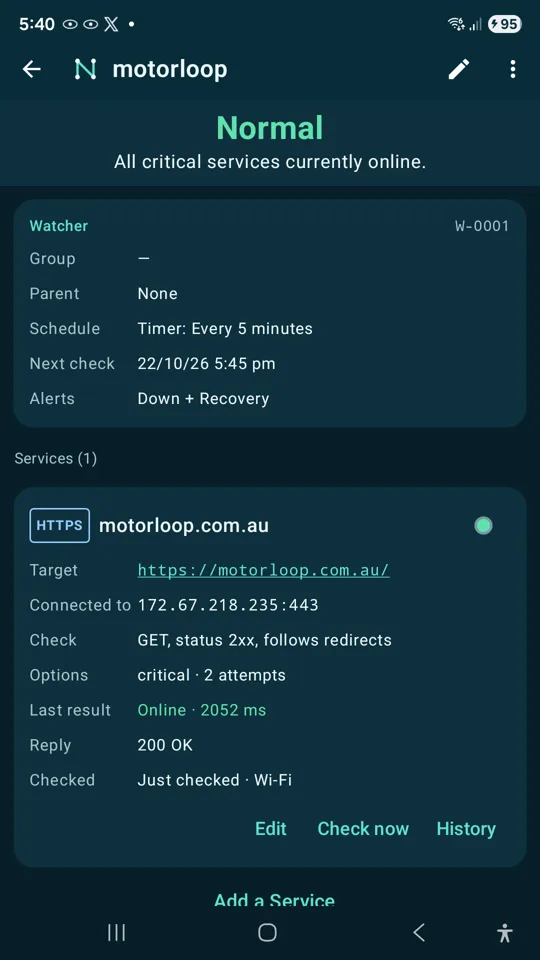
No per-node setup, no third-party push service. When a watcher goes down you get a high-priority notification listing which services failed and why. When it comes back, you hear about that too. Optional repeat reminders while something stays down.
- 04
Parent and child dependencies stop alert storms
Put the router, VPN or gateway as the parent. While it is down, everything behind it is suspended rather than reported as failed: no 40 notifications for one outage. When the parent recovers, its children are re-checked immediately.
- 05
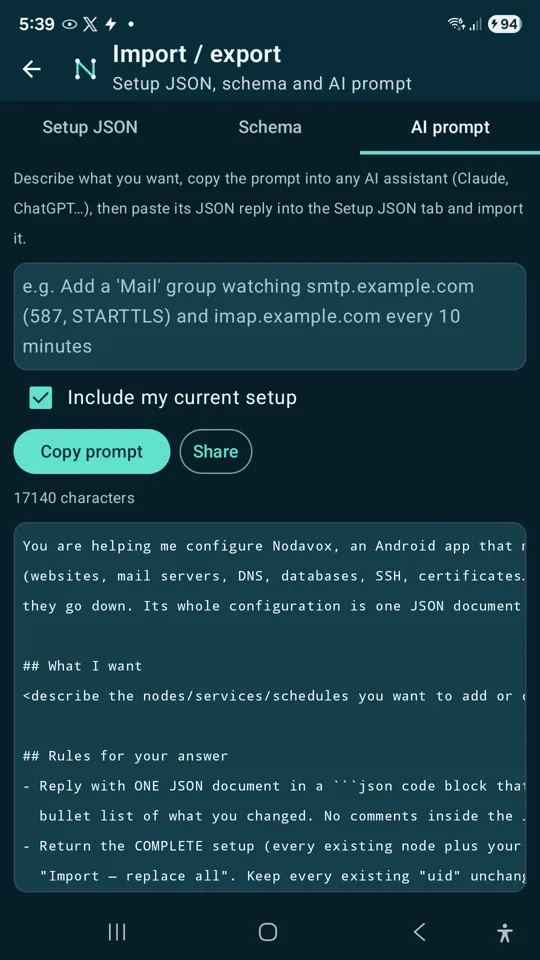
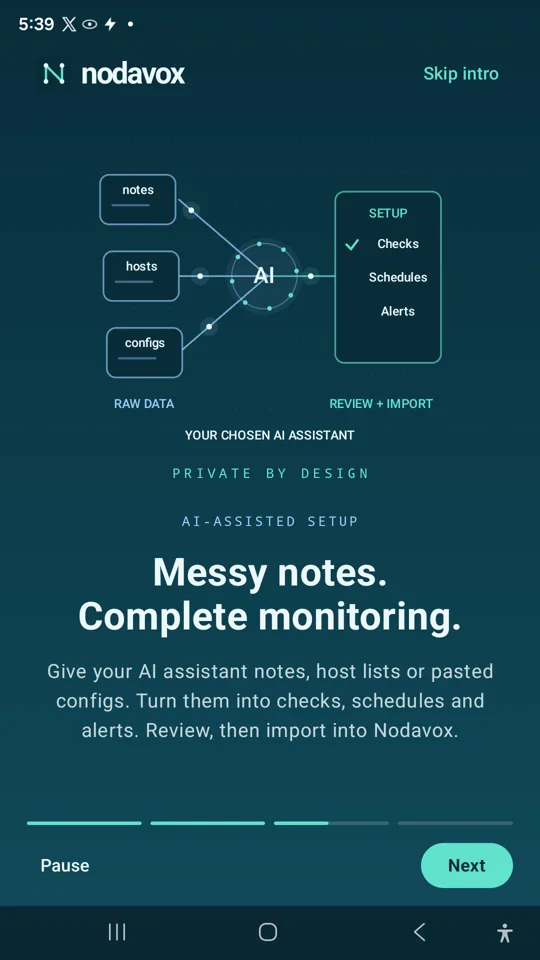
Describe your network, let your AI write the config
Paste your notes, host lists or config snippets into Nodavox and it generates a prompt that includes its own setup schema. Hand that to the AI assistant you already use, paste the JSON back, validate, import. Nodavox never calls an AI provider itself, and it tells the assistant not to invent hosts or secrets.
- 06
It keeps watching in the background
A foreground service and exact scheduled alarms mean checks run on their timer or interface trigger even when the app is closed. Timed pauses of 15 minutes to 24 hours resume on their own so maintenance windows do not become forgotten blind spots.
- 07
TLS certificates get their own watcher
Chain validity, hostname match and an expiry threshold in days. Find out your cert is expiring next week from your phone, not from a customer. Self-signed homelab services can opt in to "ignore certificate errors" so they still get checked.
- 08
A home-screen widget that actually shows status
Same views and density as the app, the same green / red / orange dots, per-watcher history bars and a one-tap refresh. Tap a row to jump straight to that watcher's detail screen.
- 09
Four views, three densities, zero clutter
Switch between Groups, Tree, Parents and All. Collapse a group, a parent or the whole list. Choose Basic, Simple or Detailed rows. Long-press for check now, edit, pause, schedule, move, duplicate, copy as JSON or multi-select for bulk actions.
- 10
Your data stays yours
No account, no cloud sync, no analytics SDK. Watchers, history and credentials live on your device, credentials encrypted. Export your whole setup as JSON (secrets excluded unless you choose otherwise), export history as CSV or JSON, and take it wherever you like. Read the privacy policy; it is short because there is little to disclose.
From install to first alert in four steps
Add a watcher
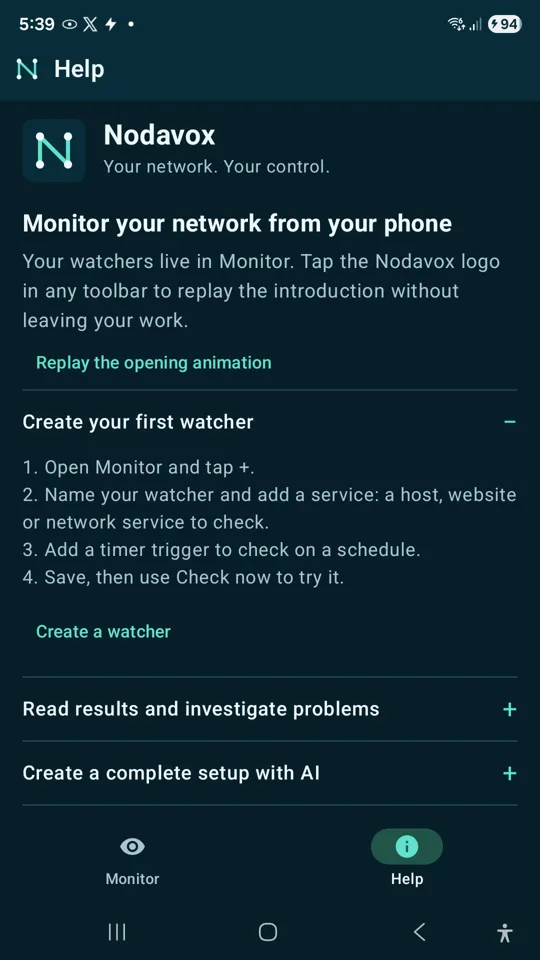
Open Monitor, tap +, name it, add a service: a host, URL or network service. Pick the type and Nodavox knows what a healthy reply looks like.
Choose triggers
Timer presets or custom cron, plus interface triggers: on any connection, on Wi-Fi, on mobile, or only on a specific favourite network.
Set dependencies
Give nodes behind your router or VPN a parent. Grouping and bulk actions keep large setups tidy.
Get alerted
Allow notifications and set battery use to Unrestricted. Down and recovery alerts arrive with the failing service and reason.
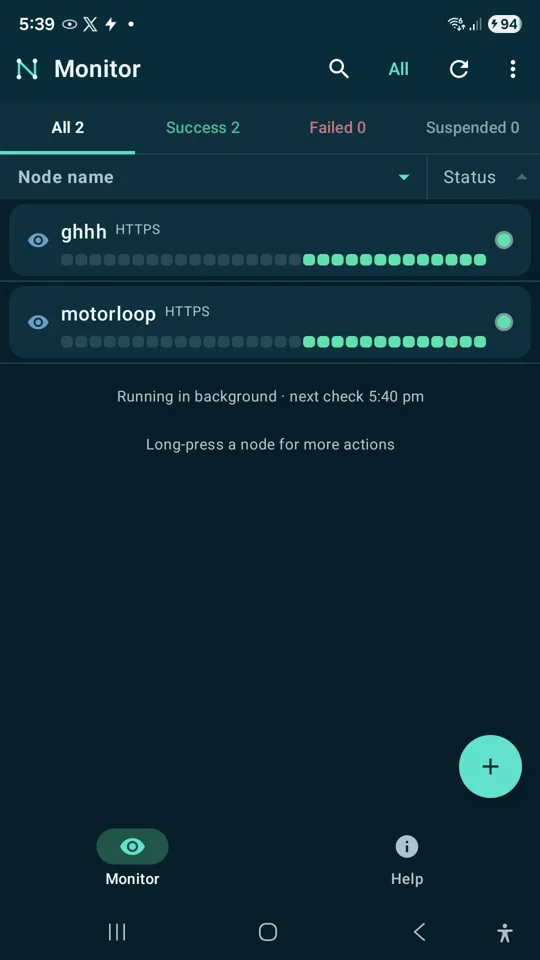
Green
Every service in the watcher replied correctly on the last check.
Red
At least one service failed. Tap through for the exact error and check history.
Orange and grey
Orange is unknown or mixed. Grey means paused, suspended behind a down parent, off its network, or never checked.
It knows when to check internal IPs and when to check public services
A phone moves between networks all day. A monitor that ignores that will either flood you with false alarms the moment you leave home, or never tell you about the services you can only reach from inside. Nodavox solves this per watcher, with triggers tied to the interface the phone is actually using.
Internal watchers
NAS, router admin page, Proxmox, printers, MQTT broker, anything on a private address.
- Trigger: Favourite network, or Wi-Fi connected. The favourite-network trigger matches the access point's BSSID, so a café network named the same as yours will not fool it.
- At home: checks run on connect and on the timer. Down alerts fire as normal.
- Away: the triggers simply do not fire. The watcher keeps its last known state and goes grey, not red. No false "NAS is down" while you are on 4G.
Public watchers
Your website, mail server, VPN endpoint, DNS, a cloud box, a customer's API.
- Trigger: Internet connected, plus a timer. Fires on Wi-Fi or mobile, wherever you are.
- Bonus: checking from mobile data proves the service is reachable from outside your network, which a check from the LAN never can.
- Combine: put the public VPN endpoint as the parent of the internal watchers you reach through it, and a VPN outage suspends them instead of alarming them.
The interface is detected through Android's connectivity API. Reading the BSSID for the favourite-network trigger is the only reason Nodavox asks for location permission, and it works without it if you only use the other triggers.
Real screenshots, real results
Captured on a Galaxy S23 Ultra against public sites. Nothing simulated.
25+ checks that prove the service is really up
Each one completes enough of the protocol to confirm the right thing answered.
- ICMP ping
- TCP port
- TCP send / expect (regex)
- HTTP
- HTTPS
- TLS certificate expiry
- SMTP + STARTTLS
- SMTPS
- IMAP + STARTTLS
- IMAPS
- POP3 + STLS
- POP3S
- FTP
- SSH
- DNS (name, record, expected value)
- NTP (stratum, offset)
- SNMP v2c
- LDAP
- LDAPS
- MySQL / MariaDB
- PostgreSQL
- Redis
- MongoDB
- MQTT
- RDP
Missing something? We aim to build it in 7 days.
Tell us the check, alert, view or integration you need. If it is reasonable and useful to other people running networks, we endeavour to ship it within 7 days. No roadmap queue, no voting board, no enterprise tier to unlock it.
Request a featureQuestions people ask before installing
Is Nodavox free?
Nodavox is completely free: no ads, no account, no monitor limits. We may introduce optional paid services in future if there is demand for them, but the Nodavox app on your phone will stay free.
What makes Nodavox an AI network monitor?
Describe your network in plain words or paste host lists and config snippets. Nodavox builds a prompt containing its own setup schema, any AI assistant returns the configuration, and Nodavox validates and imports it. Export history as CSV or JSON for the AI to analyse. The app never sends your data to an AI provider itself.
Does Nodavox need an account or a cloud service?
No. Everything runs on your phone. There is no sign-up, no server of ours in the loop and no subscription. Cloud and trusted-phone mesh monitoring are part of the long-term vision and are clearly labelled as planned; this version does not run a distributed mesh.
What does "interface-aware" actually mean?
Every watcher has its own triggers. A timer runs regardless, but the connectivity triggers only fire on the interface you choose: Wi-Fi, mobile data, any internet, or one specific favourite network identified by its BSSID. So internal addresses like 10.0.0.x are checked only when you are on your home or office Wi-Fi, while public services are checked from wherever you are. Off-site, the internal watchers simply stay quiet instead of going red.
Why does it ask for location permission?
Android only reveals the Wi-Fi network identifier (BSSID) to apps with location permission. Nodavox uses it solely for the favourite-network trigger so checks can run only when you are on a particular Wi-Fi. Decline it and every other trigger still works. Your location is never recorded or transmitted.
Will it drain my battery?
Checks are short network exchanges on the schedule you set. For reliable background alerts, Android needs Nodavox exempt from battery optimisation; the Settings screen walks you through it. Pause everything with one tap when you do not need it.
Which AI does the setup feature use?
Whichever one you already use. Nodavox builds a prompt containing its JSON setup schema and your pasted notes; you copy it to your assistant and paste the result back. Nodavox has no AI API key and makes no AI calls. The same applies to result analysis: export CSV or JSON and share it yourself.
I used the earlier Watcher app. Can I migrate?
Yes. Nodavox installs alongside the earlier com.etech.watcher package. Export your setup as JSON from the old app and import it into Nodavox with Merge or Replace.
Does it work with self-signed certificates?
Yes. Each HTTPS, TLS, SMTPS, IMAPS, LDAPS or similar service has an "ignore certificate errors" option for homelab services with private CAs.
How does Nodavox compare with UptimeRobot, Uptime Kuma or Fing?
Cloud monitors check public endpoints from the internet, self-hosted monitors need a server of their own, and scanners find devices rather than watch services. Nodavox runs on your phone, inside your network, with protocol-aware checks and alerts. The full comparison is at nodavox.com/compare.
Can you add a feature I need?
Ask for it by email. If a request is reasonable and useful to other users, we aim to build it within 7 days.
Where do I get support?
Email nodavox@motorloop.com.au. The in-app Help tab covers setup, reading results, AI import and export, background operation and privacy.
Put your network in your pocket
Nodavox is free and currently in early access on Google Play. Install it, add one watcher, and see your first green dot in under a minute.
Get it on Google PlayEarly-access builds are distributed through Google Play testing tracks. If the listing is not yet visible to you, email nodavox@motorloop.com.au for an invite.